SDK Docker 环境搭建
本文介绍如何使用 Docker 为 Tina Linux SDK 搭建标准编译环境。SDK 源码、配置和编译产物始终保留在宿主机,Docker 容器只提供 Ubuntu 20.04 工具链与依赖;容器退出后产物不会丢失。
完成本篇操作后,您可以:
- 在任意已安装 Docker 的 Linux 主机上复现一致的 Tina 编译环境;
- 进入
(tina-docker)交互式 Shell,直接使用lunch、m、mp、pack等命令; - 以非交互方式从宿主机触发单次编译或打包。
工作原理
传统方式在宿主机直接安装编译工具链,多版本 SDK 共用一台主机时容易产生依赖冲突、环境变量污染和复现困难。Docker 方案把工具链隔离在容器内,宿主机只保留源码与产物:
- 源码与产物留在宿主机:SDK 根目录以 bind mount 方式挂载进容器,容器内编译产生的
out/、下载缓存、配置修改直接写回宿主机,容器退出后仍然保留。 - 同路径挂载:SDK 在容器内的挂载路径与宿主机绝对路径一致。Tina 的
.buildconfig记录绝对路径,同路径挂载可避免配置失效。 - 权限与宿主机一致:容器按 SDK 目录属主的 UID/GID 运行,编译产物不会变成宿主机上的 root 文件。
- 工具链可复现:所有依赖由
docker/Dockerfile固定,团队成员得到一致的编译环境。
环境要求
- x86_64 架构的 Linux 宿主机
- Docker Engine 与 Docker Compose v2(命令形式为
docker compose) - 区分大小写的文件系统(SDK 源码包含仅大小写不同的文件名)
- 足够的磁盘空间(Docker 镜像约 2 GB,SDK
out/视方案可达数十 GB) - 当前用户可执行 Docker 命令
确认 Docker 与 Compose 可用:
docker version
docker compose version
安装 Docker
Docker 安装请参考官方文档 Install Docker Engine。下面以 Ubuntu 为例给出关键步骤。
删除冲突的旧版本
sudo apt remove $(dpkg --get-selections docker.io docker-compose docker-compose-v2 docker-doc podman-docker containerd runc | cut -f1)
添加 Docker 官方源并安装
# 添加 Docker 官方 GPG key
sudo apt update
sudo apt install -y ca-certificates curl
sudo install -m 0755 -d /etc/apt/keyrings
sudo curl -fsSL https://download.docker.com/linux/ubuntu/gpg -o /etc/apt/keyrings/docker.asc
sudo chmod a+r /etc/apt/keyrings/docker.asc

# 添加 apt 源
sudo tee /etc/apt/sources.list.d/docker.sources <<EOF
Types: deb
URIs: https://download.docker.com/linux/ubuntu
Suites: $(. /etc/os-release && echo "${UBUNTU_CODENAME:-$VERSION_CODENAME}")
Components: stable
Architectures: $(dpkg --print-architecture)
Signed-By: /etc/apt/keyrings/docker.asc
EOF

sudo apt update
sudo apt install -y docker-ce docker-ce-cli containerd.io docker-buildx-plugin docker-compose-plugin
将当前用户加入 docker 组
sudo usermod -aG docker "$USER"
newgrp docker
加入 docker 组后需重新登录,或执行 newgrp docker 使权限立即生效。
验证安装
docker ps
仅输出表头、无运行容器,即表示 Docker daemon 已就绪:

获取 docker.py
docker.py 是生成 Docker 编译环境的 Python 3 脚本。请将下方完整内容保存为 SDK 根目录下的 docker.py。
运行前需要 Python 3:
sudo apt install -y python3
脚本默认以 docker.py 所在目录作为 SDK 根目录,并校验该目录包含 build/envsetup.sh 与 build/.tinatopdir。若脚本放在其他位置,可用 --sdk-root 指定 SDK 根目录。
docker.py
#!/usr/bin/env python3
# SPDX-License-Identifier: MIT
# Copyright (c) 2026 Allwinner Technology Co., Ltd. All rights reserved.
# Author: zhangyuanjing <zhangyuanjing@allwinnertech.com>
"""Generate the bind-mounted Docker Compose environment for Tina SDK.
Two Tina SDK generations are supported:
- Tina 5.0: current SDK layout (build/.tinatopdir), built with Ubuntu 20.04;
- Tina 4.0: OpenWrt-based SDK layout (build/envsetup.sh + Makefile + rules.mk),
built with Ubuntu 14.04 (trusty), which provides the gcc 4.8 / Python 2.7 /
OpenSSL 1.0 host environment these older trees were developed on.
SDK recognition and flavor-specific operations are implemented with the
factory pattern: SdkFactory.create() inspects the SDK root and returns the
matching SdkFlavor product (Tina5Sdk or Tina4Sdk), and all generation and
checking code operates on that product's interface.
"""
import argparse
import os
import re
import shutil
import stat
import subprocess
import sys
import tempfile
import textwrap
from abc import ABC, abstractmethod
from pathlib import Path
GENERATOR_VERSION = "13"
def template(value):
return textwrap.dedent(value).lstrip("\n")
def sdk_name(root):
name = re.sub(r"[^a-z0-9_.-]+", "-", root.name.lower()).strip("-")
return name or "tina"
def saved_mirror(root):
path = root / "docker-compose.yaml"
if not path.is_file():
return None
try:
text = path.read_text(encoding="utf-8")
except (OSError, UnicodeError):
return None
match = re.search(r'UBUNTU_MIRROR: "\$\{UBUNTU_MIRROR:-([^}]+)\}"', text)
return match.group(1) if match else None
class SdkFlavor(ABC):
"""Base class of the SDK flavor products produced by SdkFactory."""
key = None
name = None
ubuntu_version = None
markers = ()
mirror = "official"
@classmethod
def matches(cls, root):
return all((root / marker).is_file() for marker in cls.markers)
def describe(self):
return "{} SDK, Ubuntu {}".format(self.name, self.ubuntu_version)
def image_name(self, root):
return "{}-build:ubuntu-{}".format(sdk_name(root), self.ubuntu_version)
def hostname(self, root):
return sdk_name(root)
def compose_yaml(self, root):
return template(
r"""
services:
tina:
image: __IMAGE__
build:
context: ./docker
dockerfile: Dockerfile
args:
UBUNTU_MIRROR: "${UBUNTU_MIRROR:-__UBUNTU_MIRROR__}"
init: true
hostname: __HOSTNAME__
stdin_open: true
tty: true
working_dir: "${PWD:?Run Docker Compose from the SDK root}"
environment:
TINA_SDK_DIR: "${PWD:?Run Docker Compose from the SDK root}"
TERM: "${TERM:-xterm-256color}"
TZ: "${TZ:-Etc/UTC}"
HTTP_PROXY: "${HTTP_PROXY:-}"
HTTPS_PROXY: "${HTTPS_PROXY:-}"
NO_PROXY: "${NO_PROXY:-}"
http_proxy: "${http_proxy:-}"
https_proxy: "${https_proxy:-}"
no_proxy: "${no_proxy:-}"
volumes:
- type: bind
source: .
target: "${PWD:?Run Docker Compose from the SDK root}"
- type: volume
source: tina-home
target: /home/tina
volumes:
tina-home:
"""
).replace("__IMAGE__", self.image_name(root)).replace(
"__HOSTNAME__", self.hostname(root)
).replace("__UBUNTU_MIRROR__", self.mirror)
def bashrc(self):
return template(
r"""
if [[ -f /etc/bash.bashrc ]]; then
source /etc/bash.bashrc
fi
if [[ -f "$HOME/.bashrc" ]]; then
source "$HOME/.bashrc"
fi
cd -- "$TINA_SDK_DIR" || return
source "$TINA_SDK_DIR/build/envsetup.sh"
PS1='(tina-docker) \u@\h:\w\$ '
"""
)
def dockerignore(self):
return template(
r"""
*
!Dockerfile
!tina-entrypoint
!tina-session
!tina-bashrc
"""
)
@abstractmethod
def dockerfile(self):
raise NotImplementedError
@abstractmethod
def entrypoint(self):
raise NotImplementedError
@abstractmethod
def session(self):
raise NotImplementedError
@abstractmethod
def readme(self):
raise NotImplementedError
def files(self, root):
return {
"docker-compose.yaml": (self.compose_yaml(root), 0o644),
"docker/Dockerfile": (self.dockerfile(), 0o644),
"docker/tina-entrypoint": (self.entrypoint(), 0o755),
"docker/tina-session": (self.session(), 0o755),
"docker/tina-bashrc": (self.bashrc(), 0o644),
"docker/.dockerignore": (self.dockerignore(), 0o644),
"docker/README.md": (self.readme(), 0o644),
}
class SdkFactory:
"""Factory that recognizes the SDK flavor of a root and creates its product."""
_registry = {}
@classmethod
def register(cls, flavor):
cls._registry[flavor.key] = flavor
return flavor
@classmethod
def create(cls, root, flavor=None):
if flavor is not None:
flavor_class = cls._registry.get(flavor)
if flavor_class is None:
raise ValueError("unknown SDK flavor: {}".format(flavor))
if not flavor_class.matches(root):
raise ValueError(
"{} does not match the {} SDK layout (requires {})".format(
root, flavor, " and ".join(flavor_class.markers)
)
)
return flavor_class()
for flavor_class in cls._registry.values():
if flavor_class.matches(root):
return flavor_class()
raise ValueError(
"{} is not a supported Tina SDK root "
"(Tina 5.0: build/.tinatopdir; "
"Tina 4.0: build/envsetup.sh + Makefile + rules.mk)".format(root)
)
@SdkFactory.register
class Tina5Sdk(SdkFlavor):
key = "tina5"
name = "Tina 5.0"
ubuntu_version = "20.04"
markers = ("build/.tinatopdir", "build/envsetup.sh")
def dockerfile(self):
return template(
r"""
FROM ubuntu:20.04
ARG UBUNTU_MIRROR=official
ARG DEBIAN_FRONTEND=noninteractive
ENV LANG=en_US.UTF-8 \
LC_ALL=en_US.UTF-8 \
TZ=Etc/UTC
RUN case "$UBUNTU_MIRROR" in \
official) ;; \
cn) \
sed -i \
-e 's|http://archive.ubuntu.com/ubuntu|http://mirrors.aliyun.com/ubuntu|g' \
-e 's|http://security.ubuntu.com/ubuntu|http://mirrors.aliyun.com/ubuntu|g' \
/etc/apt/sources.list \
;; \
*) echo "ERROR: unsupported Ubuntu mirror: $UBUNTU_MIRROR" >&2; exit 2 ;; \
esac \
&& dpkg --add-architecture i386 \
&& apt-get update \
&& apt-get install -y --no-install-recommends \
android-tools-mkbootimg autoconf automake bc \
bison bzr build-essential bzip2 \
busybox-static ca-certificates ccache cmake \
cpio cvs curl device-tree-compiler \
diffutils dosfstools e2fsprogs ecj \
fakeroot file flex g++-multilib \
gawk gcc-multilib gettext git \
gosu gperf kconfig-frontends lib32z1 \
libaio1 libc6:i386 libdb1-compat libelf-dev \
libncurses5 libncurses5-dev libncurses-dev libncursesw5 \
libpython3-dev libreadline5 libssl-dev libstdc++6:i386 \
libtool libxml-parser-perl libxml2-utils locales \
lsof lz4 m4 mercurial \
mtd-utils mtools patch perl \
pkg-config python-is-python3 python2 python3 \
python3-dev python3-distutils python3-pyelftools python3-yaml \
quilt rsync squashfs-tools subversion \
sudo time tree u-boot-tools \
unzip util-linux wget xsltproc \
xxd xz-utils zip zlib1g-dev \
&& locale-gen en_US.UTF-8 \
&& apt-get clean \
&& rm -rf /var/lib/apt/lists/*
COPY tina-entrypoint /usr/local/bin/tina-entrypoint
COPY tina-session /usr/local/bin/tina-session
COPY tina-bashrc /usr/local/share/tina/bashrc
RUN chmod 0755 /usr/local/bin/tina-entrypoint /usr/local/bin/tina-session
ENTRYPOINT ["/usr/local/bin/tina-entrypoint"]
"""
)
def entrypoint(self):
return template(
r"""
#!/usr/bin/env bash
set -euo pipefail
: "${TINA_SDK_DIR:?TINA_SDK_DIR is required}"
container_home="${TINA_CONTAINER_HOME:-/home/tina}"
if [[ ! -d "$TINA_SDK_DIR" ]]; then
echo "ERROR: SDK bind mount not found: $TINA_SDK_DIR" >&2
exit 2
fi
# Compose cannot evaluate id(1), so use the bind mount owner by default.
host_uid="${LOCAL_UID:-$(stat -c '%u' "$TINA_SDK_DIR")}"
host_gid="${LOCAL_GID:-$(stat -c '%g' "$TINA_SDK_DIR")}"
if [[ ! "$host_uid" =~ ^[0-9]+$ || ! "$host_gid" =~ ^[0-9]+$ ]]; then
echo "ERROR: LOCAL_UID and LOCAL_GID must be numeric." >&2
exit 2
fi
if [[ "$host_uid" == "0" ]]; then
install -d -m 0755 "$container_home"
exec env \
HOME="$container_home" \
USER=root \
LOGNAME=root \
SHELL=/bin/bash \
/usr/local/bin/tina-session "$@"
fi
group_record="$(getent group "$host_gid" || true)"
if [[ -n "$group_record" ]]; then
group_name="${group_record%%:*}"
else
group_name=tina-host
groupadd --gid "$host_gid" "$group_name"
fi
passwd_record="$(getent passwd "$host_uid" || true)"
if [[ -n "$passwd_record" ]]; then
user_name="${passwd_record%%:*}"
else
user_name=tina
useradd \
--uid "$host_uid" \
--gid "$group_name" \
--home-dir "$container_home" \
--no-create-home \
--shell /bin/bash \
"$user_name"
fi
install -d -m 0755 "$container_home"
chown "$host_uid:$host_gid" "$container_home"
printf '%s ALL=(ALL) NOPASSWD:ALL\n' "$user_name" > /etc/sudoers.d/tina-host
chmod 0440 /etc/sudoers.d/tina-host
exec gosu "$host_uid:$host_gid" env \
HOME="$container_home" \
USER="$user_name" \
LOGNAME="$user_name" \
SHELL=/bin/bash \
/usr/local/bin/tina-session "$@"
"""
)
def session(self):
return template(
r"""
#!/usr/bin/env bash
set -o pipefail
umask 0022
: "${TINA_SDK_DIR:?TINA_SDK_DIR is required}"
if ! cd -- "$TINA_SDK_DIR"; then
exit 2
fi
if [[ ! -f build/.tinatopdir || ! -f build/envsetup.sh ]]; then
echo "ERROR: $TINA_SDK_DIR is not a Tina SDK root." >&2
exit 2
fi
load_tina_environment()
{
# Legacy SDK setup scripts are not compatible with nounset.
set +u
source "$TINA_SDK_DIR/build/envsetup.sh"
}
run_doctor()
{
local failed=0
local command_name
local configured_top
for command_name in \
bash bc bison busybox ccache cmake cpio dtc ecj fakeroot \
flex g++ gawk gcc git gperf lz4 make mkbootimg mkfs.ext4 \
mkfs.ubifs mkfs.vfat mkimage mksquashfs perl python2 python3 \
rsync ubinize xsltproc; do
if ! command -v "$command_name" >/dev/null 2>&1; then
echo "ERROR: missing host command: $command_name" >&2
failed=1
fi
done
if ! python3 -c 'import elftools, yaml' >/dev/null 2>&1; then
echo "ERROR: Python 3 modules are missing: elftools and/or yaml" >&2
failed=1
fi
for command_name in dos2unix unix2dos; do
if ! busybox --list 2>/dev/null | grep -qx "$command_name"; then
echo "ERROR: BusyBox applet is missing: $command_name" >&2
failed=1
fi
done
for command_name in lunch m mp pack mkernel ck cout; do
if ! declare -F "$command_name" >/dev/null 2>&1; then
echo "ERROR: envsetup function was not loaded: $command_name" >&2
failed=1
fi
done
if [[ ! -x prebuilt/hostbuilt/python3.8/bin/python3 ]]; then
echo "ERROR: SDK prebuilt Python 3.8 is missing or not executable." >&2
failed=1
elif ! prebuilt/hostbuilt/python3.8/bin/python3 -c 'import distutils' >/dev/null 2>&1; then
echo "ERROR: SDK prebuilt Python 3.8 cannot import distutils." >&2
failed=1
fi
if [[ -f .buildconfig ]]; then
configured_top="$(sed -n 's/^export LICHEE_TOP_DIR=//p' .buildconfig | tail -n 1)"
if [[ -n "$configured_top" && "$configured_top" != "$TINA_SDK_DIR" ]]; then
echo "ERROR: .buildconfig expects $configured_top" >&2
echo " but the SDK is mounted at $TINA_SDK_DIR" >&2
failed=1
fi
else
echo "NOTE: .buildconfig is absent; run lunch or ./build.sh config first."
fi
if (( failed != 0 )); then
return 1
fi
echo "Docker build environment: OK"
echo "SDK: $TINA_SDK_DIR"
echo "User: $(id -u):$(id -g)"
echo "envsetup functions: lunch m mp pack mkernel ck cout"
}
if (( $# == 0 )); then
exec bash --noprofile --rcfile /usr/local/share/tina/bashrc -i
fi
load_tina_environment || exit $?
case "$1" in
doctor)
shift
if (( $# != 0 )); then
echo "ERROR: doctor does not accept arguments." >&2
exit 2
fi
run_doctor
;;
*)
"$@"
;;
esac
"""
)
def readme(self):
return template(
r"""
# Tina SDK Docker Compose environment
This is a Tina 5.0 SDK. The SDK source and all build output stay on
the host. Docker only provides the Ubuntu 20.04 build tools. Run
commands from the SDK root.
Generate and enter the development shell in one command:
```bash
python3 docker.py --shell
```
Use the China Ubuntu package mirror when the official APT source is slow:
```bash
python3 docker.py --mirror cn --shell
```
The chosen mirror is saved as the default in `docker-compose.yaml`,
so later builds reuse it. To switch mirrors, re-run with `--mirror`
and `--force`, which rewrites the saved default.
Or generate first and use Compose directly:
```bash
python3 docker.py
docker compose -f docker-compose.yaml run --rm --build tina
```
The shell automatically sources `build/envsetup.sh`, so `lunch`, `m`,
`mp`, `pack`, `mkernel`, and navigation functions are available.
Commands can also run directly from the host:
```bash
docker compose -f docker-compose.yaml run --rm tina doctor
docker compose -f docker-compose.yaml run --rm tina lunch
docker compose -f docker-compose.yaml run --rm tina mp -j32
docker compose -f docker-compose.yaml run --rm tina mkernel
docker compose -f docker-compose.yaml run --rm tina ./build.sh kernel
```
The SDK is bind-mounted at the same absolute path inside the container
because `.buildconfig` stores absolute paths. The container derives its
UID/GID from the mounted SDK, preventing root-owned host build output.
Its home directory is stored in a named Docker volume.
"""
)
@SdkFactory.register
class Tina4Sdk(SdkFlavor):
key = "tina4"
name = "Tina 4.0"
ubuntu_version = "14.04"
markers = ("build/envsetup.sh", "Makefile", "rules.mk")
def dockerfile(self):
return template(
r"""
FROM ubuntu:14.04
ARG UBUNTU_MIRROR=official
ARG DEBIAN_FRONTEND=noninteractive
ENV LANG=en_US.UTF-8 \
LC_ALL=en_US.UTF-8 \
TZ=Etc/UTC
RUN case "$UBUNTU_MIRROR" in \
official) ;; \
cn) \
sed -i \
-e 's|http://archive.ubuntu.com/ubuntu|http://mirrors.aliyun.com/ubuntu|g' \
-e 's|http://security.ubuntu.com/ubuntu|http://mirrors.aliyun.com/ubuntu|g' \
/etc/apt/sources.list \
;; \
*) echo "ERROR: unsupported Ubuntu mirror: $UBUNTU_MIRROR" >&2; exit 2 ;; \
esac \
&& rm -f /etc/apt/sources.list.d/ubuntu-esm-*.list \
&& printf 'Acquire::Check-Valid-Until "false";\n' > /etc/apt/apt.conf.d/99no-valid-until \
&& dpkg --add-architecture i386 \
&& apt-get update \
&& apt-get install -y --no-install-recommends \
autoconf automake bc \
bison bzr build-essential bzip2 \
busybox-static ca-certificates ccache cmake \
cpio cvs curl device-tree-compiler \
diffutils dosfstools dos2unix e2fsprogs ecj \
fakeroot file flex g++-multilib \
gawk gcc-multilib gettext git \
gperf lib32z1 \
libaio1 libc6:i386 libdb1-compat libelf-dev \
liblz4-tool libncurses5 libncurses5-dev libncurses5:i386 \
libncursesw5 libreadline5 libssl-dev libstdc++6:i386 \
libtool libxml-parser-perl libxml2-utils locales \
lsof m4 mercurial \
mtd-utils mtools patch perl \
pkg-config python python-dev python3 \
python-yaml quilt rsync squashfs-tools subversion \
sudo time tree u-boot-tools \
unzip util-linux vim-common wget xsltproc \
xz-utils zip zlib1g-dev \
&& locale-gen en_US.UTF-8 \
&& apt-get clean \
&& rm -rf /var/lib/apt/lists/*
COPY tina-entrypoint /usr/local/bin/tina-entrypoint
COPY tina-session /usr/local/bin/tina-session
COPY tina-bashrc /usr/local/share/tina/bashrc
RUN chmod 0755 /usr/local/bin/tina-entrypoint /usr/local/bin/tina-session
ENTRYPOINT ["/usr/local/bin/tina-entrypoint"]
"""
)
def entrypoint(self):
return template(
r"""
#!/usr/bin/env bash
set -euo pipefail
: "${TINA_SDK_DIR:?TINA_SDK_DIR is required}"
container_home="${TINA_CONTAINER_HOME:-/home/tina}"
if [[ ! -d "$TINA_SDK_DIR" ]]; then
echo "ERROR: SDK bind mount not found: $TINA_SDK_DIR" >&2
exit 2
fi
# Compose cannot evaluate id(1), so use the bind mount owner by default.
host_uid="${LOCAL_UID:-$(stat -c '%u' "$TINA_SDK_DIR")}"
host_gid="${LOCAL_GID:-$(stat -c '%g' "$TINA_SDK_DIR")}"
if [[ ! "$host_uid" =~ ^[0-9]+$ || ! "$host_gid" =~ ^[0-9]+$ ]]; then
echo "ERROR: LOCAL_UID and LOCAL_GID must be numeric." >&2
exit 2
fi
if [[ "$host_uid" == "0" ]]; then
install -d -m 0755 "$container_home"
exec env \
HOME="$container_home" \
USER=root \
LOGNAME=root \
SHELL=/bin/bash \
/usr/local/bin/tina-session "$@"
fi
group_record="$(getent group "$host_gid" || true)"
if [[ -n "$group_record" ]]; then
group_name="${group_record%%:*}"
else
group_name=tina-host
groupadd --gid "$host_gid" "$group_name"
fi
passwd_record="$(getent passwd "$host_uid" || true)"
if [[ -n "$passwd_record" ]]; then
user_name="${passwd_record%%:*}"
else
user_name=tina
useradd \
--uid "$host_uid" \
--gid "$group_name" \
--home-dir "$container_home" \
--no-create-home \
--shell /bin/bash \
"$user_name"
fi
install -d -m 0755 "$container_home"
chown "$host_uid:$host_gid" "$container_home"
printf '%s ALL=(ALL) NOPASSWD:ALL\n' "$user_name" > /etc/sudoers.d/tina-host
chmod 0440 /etc/sudoers.d/tina-host
# Ubuntu 14.04 has no gosu package; sudo drops to the host UID/GID.
# sudo resets the environment, so pass the container variables through.
exec sudo -u "#${host_uid}" env \
TINA_SDK_DIR="$TINA_SDK_DIR" \
TERM="${TERM:-}" \
TZ="${TZ:-}" \
HTTP_PROXY="${HTTP_PROXY:-}" \
HTTPS_PROXY="${HTTPS_PROXY:-}" \
NO_PROXY="${NO_PROXY:-}" \
http_proxy="${http_proxy:-}" \
https_proxy="${https_proxy:-}" \
no_proxy="${no_proxy:-}" \
HOME="$container_home" \
USER="$user_name" \
LOGNAME="$user_name" \
SHELL=/bin/bash \
/usr/local/bin/tina-session "$@"
"""
)
def session(self):
return template(
r"""
#!/usr/bin/env bash
set -o pipefail
umask 0022
: "${TINA_SDK_DIR:?TINA_SDK_DIR is required}"
if ! cd -- "$TINA_SDK_DIR"; then
exit 2
fi
if [[ ! -f build/envsetup.sh || ( ! -f build/.tinatopdir && ! -f Makefile ) ]]; then
echo "ERROR: $TINA_SDK_DIR is not a Tina SDK root." >&2
exit 2
fi
load_tina_environment()
{
# Legacy SDK setup scripts are not compatible with nounset.
set +u
source "$TINA_SDK_DIR/build/envsetup.sh"
}
run_doctor()
{
local failed=0
local command_name
for command_name in \
bash bc bison busybox ccache cmake cpio dtc ecj fakeroot \
flex g++ gawk gcc git gperf lz4 make mkfs.ext4 mkfs.ubifs \
mkfs.vfat mkimage mksquashfs perl python rsync ubinize wget \
xsltproc; do
if ! command -v "$command_name" >/dev/null 2>&1; then
echo "ERROR: missing host command: $command_name" >&2
failed=1
fi
done
if ! python -V 2>&1 | grep -q '^Python 2'; then
echo "ERROR: the legacy SDK build scripts require Python 2.x" >&2
failed=1
fi
for command_name in dos2unix unix2dos; do
if ! command -v "$command_name" >/dev/null 2>&1; then
echo "ERROR: missing host command: $command_name" >&2
failed=1
fi
done
for command_name in lunch m mm mp p pd pack mboot mkernel croot cout; do
if ! declare -F "$command_name" >/dev/null 2>&1; then
echo "ERROR: envsetup function was not loaded: $command_name" >&2
failed=1
fi
done
if ! find prebuilt/gcc/linux-x86 -type f \( -name '*-gcc' -o -name 'gcc' \) | grep -q .; then
echo "ERROR: SDK prebuilt toolchain is missing." >&2
failed=1
fi
if [[ ! -f .config ]]; then
echo "NOTE: .config is absent; run lunch or make menuconfig first."
fi
if (( failed != 0 )); then
return 1
fi
echo "Docker build environment: OK"
echo "SDK: $TINA_SDK_DIR"
echo "User: $(id -u):$(id -g)"
echo "envsetup functions: lunch m mm mp p pd pack mboot mkernel croot cout"
}
if (( $# == 0 )); then
exec bash --noprofile --rcfile /usr/local/share/tina/bashrc -i
fi
load_tina_environment || exit $?
case "$1" in
doctor)
shift
if (( $# != 0 )); then
echo "ERROR: doctor does not accept arguments." >&2
exit 2
fi
run_doctor
;;
*)
"$@"
;;
esac
"""
)
def readme(self):
return template(
r"""
# Tina SDK Docker Compose environment (Tina 4.0)
This is a Tina 4.0 (OpenWrt-based) SDK. It is built with the same
Ubuntu 14.04 (trusty) host tools it was originally developed on:
gcc 4.8, Python 2.7, GNU Make 3.81 and OpenSSL 1.0.
The SDK source and all build output stay on the host. Docker only
provides the Ubuntu 14.04 build tools. Run commands from the SDK root.
Generate and enter the development shell in one command:
```bash
python3 docker.py --shell
```
Use the China Ubuntu package mirror when the default APT source is slow:
```bash
python3 docker.py --mirror cn --shell
```
The chosen mirror is saved as the default in `docker-compose.yaml`,
so later builds reuse it. To switch mirrors, re-run with `--mirror`
and `--force`, which rewrites the saved default.
Or generate first and use Compose directly:
```bash
python3 docker.py
docker compose -f docker-compose.yaml run --rm --build tina
```
The shell automatically sources `build/envsetup.sh`, so `lunch`, `m`,
`mp`, `pack`, `mkernel`, and navigation functions are available.
Commands can also run directly from the host:
```bash
docker compose -f docker-compose.yaml run --rm tina doctor
docker compose -f docker-compose.yaml run --rm tina lunch
docker compose -f docker-compose.yaml run --rm tina mp -j32
docker compose -f docker-compose.yaml run --rm tina mkernel
```
Notes:
- Ubuntu 14.04 is end of life. The image keeps the original trusty
repositories (`archive.ubuntu.com` / `security.ubuntu.com`), removes
the Ubuntu Advantage ESM sources, and disables the repository
Valid-Until check so it can still be built today.
- The SDK is bind-mounted at the same absolute path inside the
container. The container derives its UID/GID from the mounted SDK,
preventing root-owned host build output. Its home directory is
stored in a named Docker volume.
- Host tools such as `mkbootimg` are built by the SDK itself
(`tools/pack-bintools`) and are not required on the host.
"""
)
def file_state(root, relative, content, mode):
path = root / relative
if not path.exists():
return "missing"
if not path.is_file():
return "different"
try:
current = path.read_text(encoding="utf-8")
except (OSError, UnicodeError):
return "different"
if current != content:
return "different"
if stat.S_IMODE(path.stat().st_mode) != mode:
return "mode"
return "ok"
def atomic_write(path, content, mode):
path.parent.mkdir(parents=True, exist_ok=True)
temporary = None
try:
with tempfile.NamedTemporaryFile(
mode="w",
encoding="utf-8",
newline="\n",
dir=str(path.parent),
prefix=".{}-".format(path.name),
delete=False,
) as output:
temporary = Path(output.name)
output.write(content)
os.chmod(str(temporary), mode)
os.replace(str(temporary), str(path))
finally:
if temporary is not None and temporary.exists():
temporary.unlink()
def check_files(root, sdk):
states = {}
for relative, (content, mode) in sdk.files(root).items():
states[relative] = file_state(root, relative, content, mode)
return states
def generate(root, sdk, force):
states = check_files(root, sdk)
conflicts = [name for name, state in states.items() if state == "different"]
if conflicts and not force:
print("Refusing to overwrite files with different content:", file=sys.stderr)
for name in conflicts:
print(" {}".format(name), file=sys.stderr)
print("Re-run with --force after reviewing them.", file=sys.stderr)
return False
changed = []
for relative, (content, mode) in sdk.files(root).items():
state = states[relative]
path = root / relative
if state in ("missing", "different"):
atomic_write(path, content, mode)
changed.append(relative)
elif state == "mode":
os.chmod(str(path), mode)
changed.append(relative)
if changed:
print(
"Generated Docker Compose environment (v{}, {}, APT mirror {}):".format(
GENERATOR_VERSION, sdk.describe(), sdk.mirror
)
)
for name in changed:
print(" {}".format(name))
else:
print(
"Docker Compose environment is already up to date (APT mirror {}).".format(
sdk.mirror
)
)
return True
def run_compose(root, action, mirror=None):
docker = shutil.which("docker")
if docker is None:
print("ERROR: Docker CLI was not found.", file=sys.stderr)
return 127
environment = os.environ.copy()
environment["PWD"] = str(root)
if mirror is not None:
environment["UBUNTU_MIRROR"] = mirror
version = subprocess.run(
[docker, "compose", "version"],
cwd=str(root),
env=environment,
stdout=subprocess.DEVNULL,
stderr=subprocess.DEVNULL,
)
if version.returncode != 0:
print("ERROR: Docker Compose v2 is not available.", file=sys.stderr)
return version.returncode
compose = [docker, "compose", "-f", str(root / "docker-compose.yaml")]
if action == "build":
command = compose + ["build", "tina"]
else:
command = compose + ["run", "--rm", "--build", "tina"]
return subprocess.run(command, cwd=str(root), env=environment).returncode
def parse_args():
parser = argparse.ArgumentParser(description=__doc__)
parser.add_argument(
"--sdk-root",
default=str(Path(__file__).resolve().parent),
help="Tina SDK root (default: directory containing this script)",
)
parser.add_argument(
"--flavor",
choices=("auto", "tina5", "tina4"),
default="auto",
help="SDK flavor: tina5 (Ubuntu 20.04) or tina4 (Ubuntu 14.04); "
"default: auto-detect from the SDK layout",
)
parser.add_argument(
"--force",
action="store_true",
help="overwrite generated files whose content has changed",
)
parser.add_argument(
"--check",
action="store_true",
help="check generated files without changing them",
)
parser.add_argument(
"--mirror",
choices=("official", "cn"),
help="Ubuntu APT mirror used to build the image; saved as the compose "
"default so later builds reuse it (use --force to switch)",
)
action = parser.add_mutually_exclusive_group()
action.add_argument("--build", action="store_true", help="build the image after generation")
action.add_argument(
"--shell",
action="store_true",
help="build the image and enter the envsetup-enabled shell",
)
return parser.parse_args()
def main():
args = parse_args()
if args.check and (args.force or args.build or args.shell or args.mirror):
print(
"ERROR: --check cannot be combined with --force, --build, --shell, or --mirror.",
file=sys.stderr,
)
return 2
root = Path(args.sdk_root).expanduser().resolve()
try:
sdk = SdkFactory.create(root, None if args.flavor == "auto" else args.flavor)
except ValueError as error:
print("ERROR: {}".format(error), file=sys.stderr)
return 2
mirror = args.mirror
if mirror is None:
mirror = saved_mirror(root)
if mirror not in ("official", "cn"):
mirror = "official"
sdk.mirror = mirror
if args.check:
states = check_files(root, sdk)
bad = {name: state for name, state in states.items() if state != "ok"}
if bad:
for name, state in bad.items():
print("{}: {}".format(name, state))
return 1
print("Docker Compose environment is up to date (APT mirror {}).".format(mirror))
return 0
if not generate(root, sdk, args.force):
return 2
if args.build:
return run_compose(root, "build", args.mirror)
if args.shell:
return run_compose(root, "shell", args.mirror)
print("Start development with:")
print(" docker compose -f docker-compose.yaml run --rm --build tina")
print("APT mirror: {} (saved in docker-compose.yaml)".format(mirror))
return 0
if __name__ == "__main__":
sys.exit(main())
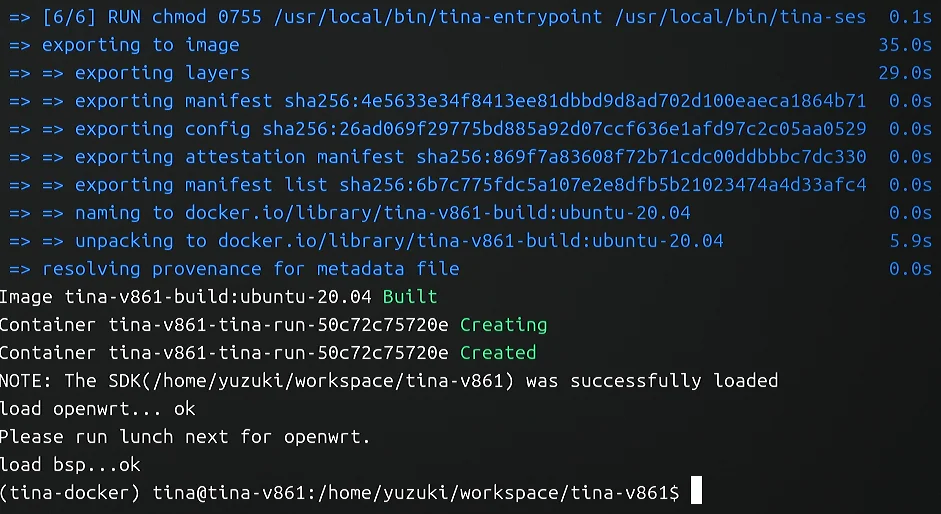
脚本生成的镜像标签为 tina-v861-build:ubuntu-20.04,容器主机名为 tina-v861。镜像内安装的是 Tina SDK 编译所需的基础工具与依赖,标签名仅为标识;如需为不同芯片区分镜像,可在生成的 docker-compose.yaml 中修改 image 与 hostname。
一键搭建开发环境
将 docker.py 放入 SDK 根目录后,一条命令即可完成环境生成、镜像构建并进入开发 Shell:
cd /path/to/tina-sdk
python3 docker.py --shell
国内访问 Ubuntu 官方源较慢时,加 --mirror cn 改用阿里云镜像构建。该选项只影响镜像内的 apt-get,不影响 ubuntu:20.04 基础镜像的拉取;切回官方源用 --mirror official。
python3 docker.py --mirror cn --shell
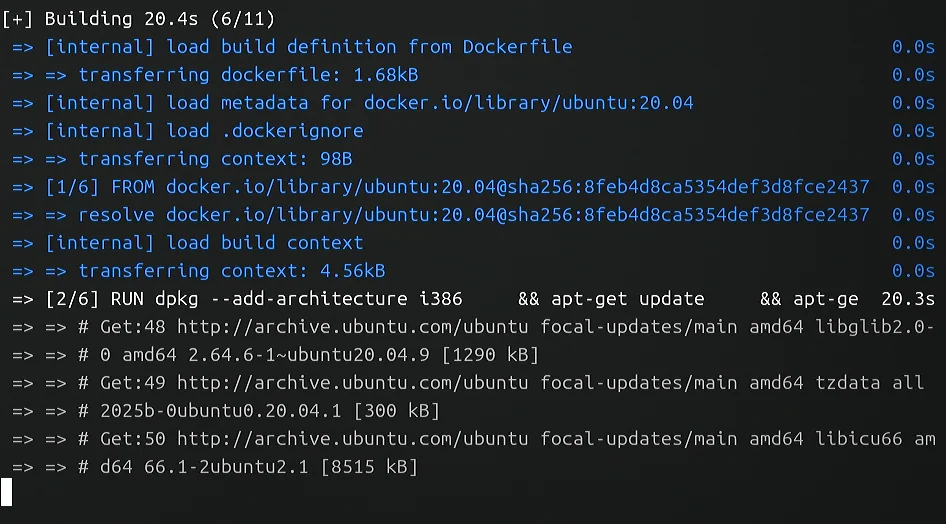
首次构建会基于 Ubuntu 20.04 安装 Tina 编译所需的工具链、32 位兼容库、Python 2/3 扩展、JDK/CMake、文件系统与镜像工具,以及打包脚本依赖的 BusyBox 等,耗时取决于网络;后续执行复用 Docker 层缓存,速度很快。
脚本会在 SDK 根目录生成 Docker Compose 环境:
docker-compose.yaml服务、环境变量与挂载定义Dockerfile基于 ubuntu:20.04 的工具链镜像tina-entrypoint容器入口:按宿主机 UID/GID 建立用户tina-session加载 envsetup、提供 doctor 子命令tina-bashrc交互 Shell 配置与提示符.dockerignoreREADME.md
构建过程中可见 apt-get 安装依赖的进度:
镜像构建完成并创建容器后,自动进入提示符以 (tina-docker) 开头的交互式 Shell:
容器会从宿主机继承 HTTP_PROXY、HTTPS_PROXY、NO_PROXY 与 TZ 环境变量。需要通过代理联网编译时,在运行命令前于宿主机 Shell 中设置这些变量即可。
使用容器编译
进入交互式 Shell
首次使用 python3 docker.py --shell 完成镜像构建后,日常进入交互式 Shell 可直接执行:
docker compose run --rm tina
容器启动时已自动执行 source build/envsetup.sh,因此 lunch、m、mp、pack、mkernel、ck、cout 等函数可直接使用,无需手动 source。提示符形如:
(tina-docker) tina@tina-v861:/path/to/tina-sdk$
退出容器:
exit
选择编译方案
首次使用或切换板级方案时执行 lunch,按菜单选择平台、板级与存储类型:
lunch
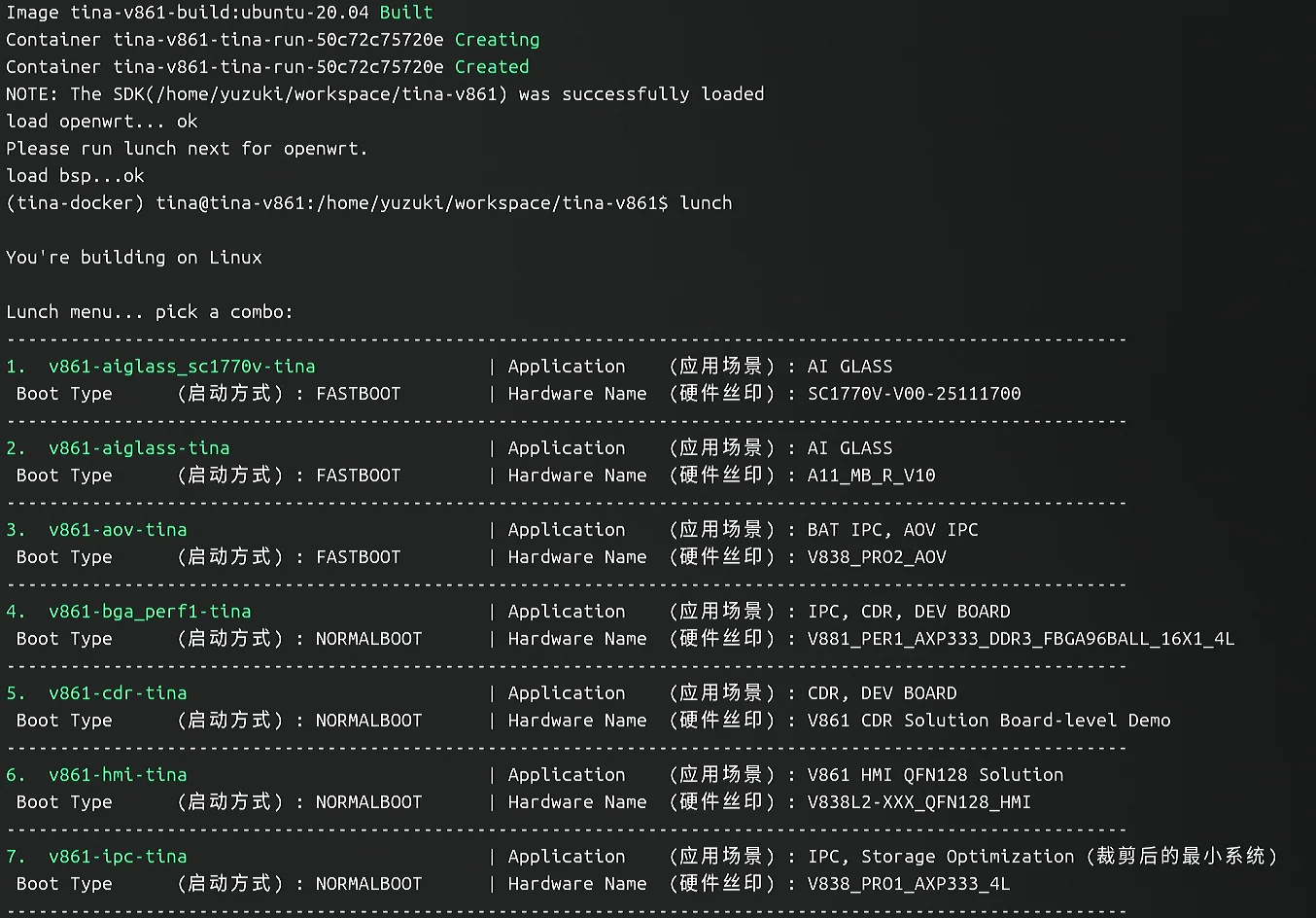
选择结果写入 SDK 根目录的 .buildconfig(以及 .buildconfig_chip)。方案未变化时无需每次进入容器都执行 lunch。
查看当前配置:
printconfig
也可用独立入口重新配置:
./build.sh config
完整编译与打包
容器交互式 Shell 中完整编译与打包:
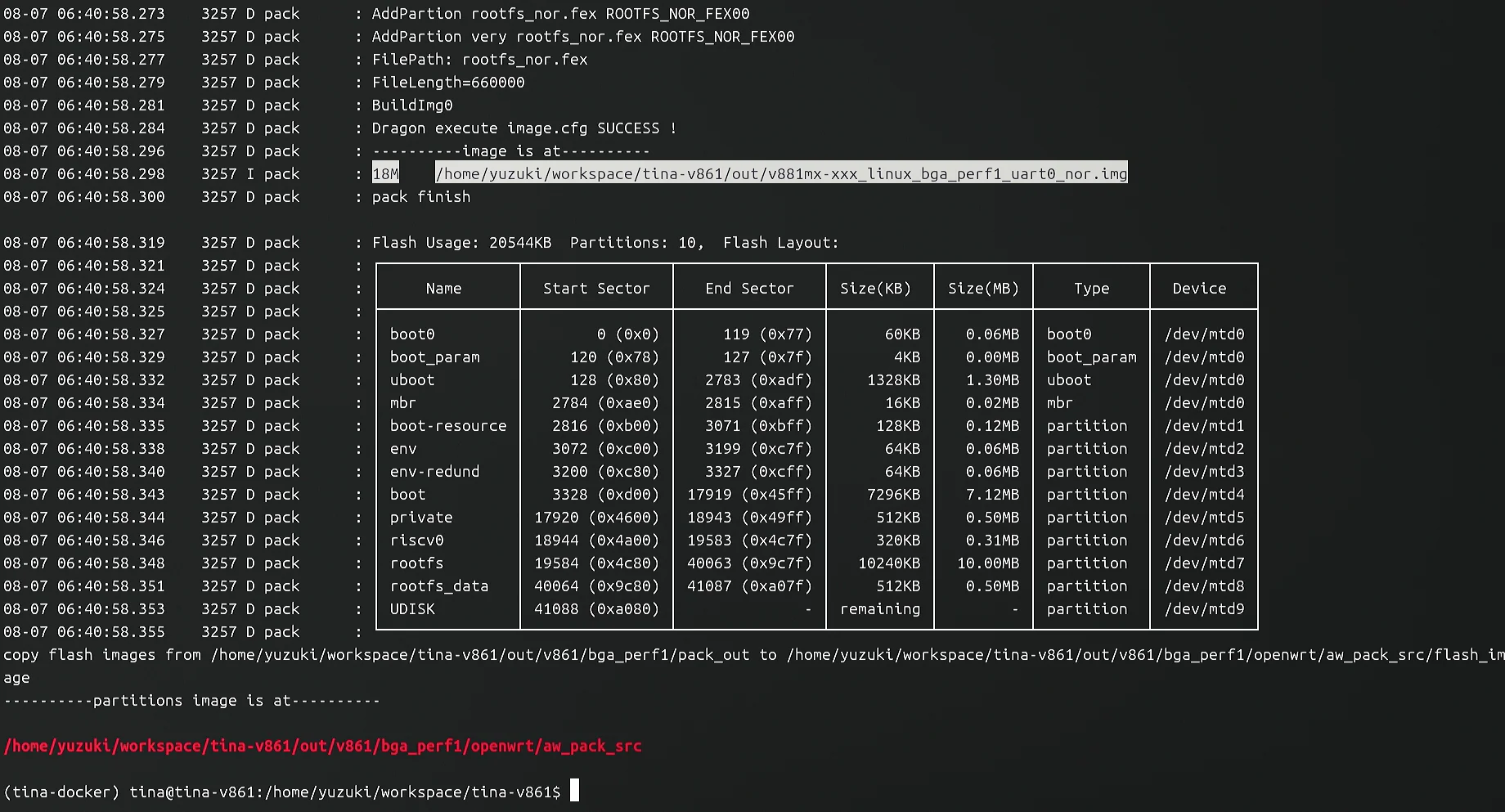
m -j32        # 编译
pack          # 打包固件
mp -j32       # 编译并打包(等价于 m 后再 pack)
-j 并行任务数按宿主机 CPU 与内存调整,内存不足时调小。
不进入交互式 Shell,也可从宿主机直接触发单次任务:
docker compose run --rm tina mp -j32
docker compose run --rm tina pack
编译产物
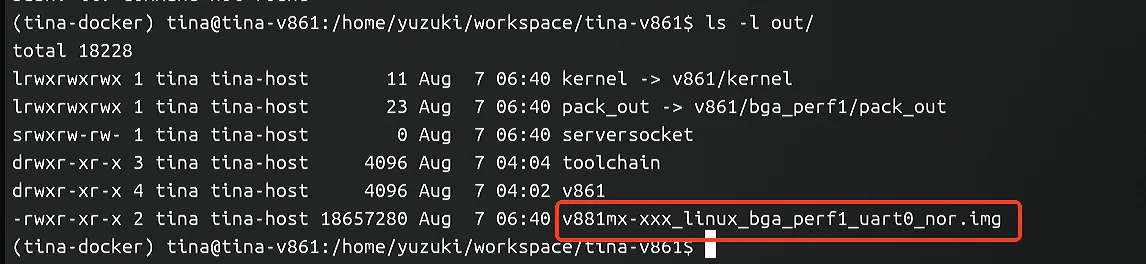
所有产物写入宿主机 SDK 的 out/ 目录。通用固件路径:
out/${IC}/${BOARD}/${LINUX_DEV}/img/${IC}_*.img
以 V861 bga_perf1_strip OpenWrt 方案为例,固件位于:
out/v861/bga_perf1_strip/openwrt/img/
查找最新生成的固件:
find out -path '*/img/*' -type f -name '*.img' \
  -printf '%TY-%Tm-%Td %TH:%TM %p\n' | sort
日常使用与维护
每天进入开发环境:
cd /path/to/tina-sdk
docker compose run --rm tina
或继续使用一键命令(会按需重建镜像):
python3 docker.py --shell
检查容器内的编译环境与 envsetup 函数是否就绪:
docker compose run --rm tina doctor
doctor 会检查编译工具链命令、Python 3 模块(elftools、yaml)、BusyBox 小程序(dos2unix、unix2dos)、envsetup 函数、SDK 自带的 Python 3.8,以及 .buildconfig 中的路径是否与挂载路径一致。
docker.py 其他常用参数:
| 命令 | 作用 |
|---|---|
python3 docker.py | 生成 Docker 环境(不构建、不进入) |
python3 docker.py --shell | 生成、构建并进入交互式 Shell |
python3 docker.py --build | 生成并构建镜像 |
python3 docker.py --mirror cn --shell | 用国内 APT 镜像构建并进入 Shell(可选 official/cn) |
python3 docker.py --check | 检查生成文件是否与模板一致 |
python3 docker.py --force | 覆盖内容已变化的生成文件 |
python3 docker.py --help | 查看全部参数 |
仅重建开发镜像(不进入容器):
docker compose build tina
docker compose build --no-cache tina   # 不使用缓存
清理 Compose 容器与网络(不影响宿主机 SDK 与 out/):
docker compose down
docker compose down -v 会同时删除容器 home 卷(含 Shell 历史等个人数据),但不会删除宿主机 SDK 与 out/。执行前请确认无需保留容器内个人数据。
查看 Docker 磁盘占用:
docker system df
故障排查
无法连接 Docker daemon
现象:执行 docker 命令报错 Cannot connect to the Docker daemon at unix:///var/run/docker.sock。
启动 Docker 服务并将当前用户加入 docker 组:
sudo systemctl enable --now docker
sudo usermod -aG docker "$USER"
newgrp docker
docker info
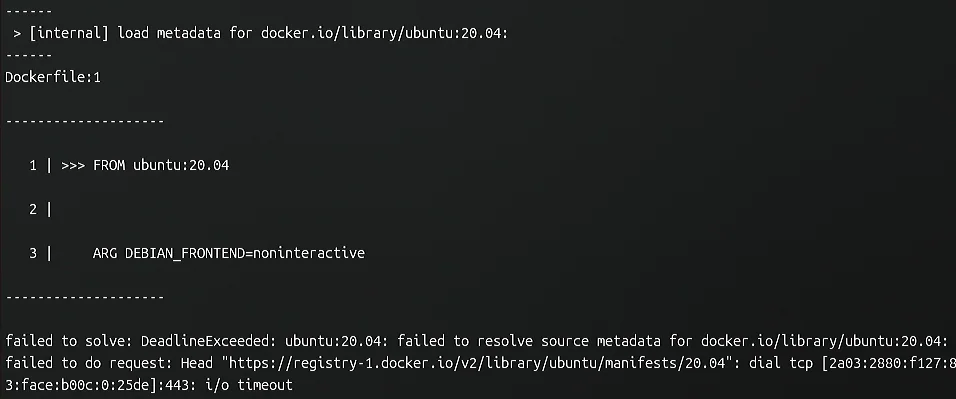
拉取 ubuntu:20.04 失败或超时
现象:构建时报错 failed to resolve source metadata for docker.io/library/ubuntu:20.04,通常因网络无法访问 Docker Hub。
先从可访问的镜像站拉取并重新标记。本例使用 DaoCloud,镜像站不可用时替换为实际可访问地址:
docker pull docker.m.daocloud.io/library/ubuntu:20.04
docker tag docker.m.daocloud.io/library/ubuntu:20.04 ubuntu:20.04
docker image inspect ubuntu:20.04 --format '{{.Id}}'
预置基础镜像后重新运行;若之前已生成过文件,需加 --force:
python3 docker.py --shell --force
若 BuildKit 仍尝试联网,可临时禁用 BuildKit 使用经典 builder:
DOCKER_BUILDKIT=0 COMPOSE_DOCKER_CLI_BUILD=0 python3 docker.py --shell
完全离线的机器可在联网机器导出镜像后拷入:
# 联网机器导出
docker save ubuntu:20.04 -o ubuntu-20.04.tar
# 离线机器导入
docker load -i ubuntu-20.04.tar
.buildconfig 路径不匹配
现象:doctor 报告 .buildconfig expects <path> but the SDK is mounted at <path>。
.buildconfig 保存绝对路径,必须从 SDK 根目录运行 Docker:
cd "$(dirname "$(readlink -f docker.py)")"
python3 docker.py --shell
SDK 已移动到新路径时,在容器内重新执行 lunch,或执行 ./build.sh config。
编译提示磁盘空间不足
分别检查 SDK 分区与 Docker 空间:
df -h .
du -sh out
docker system df
不要在未确认内容的情况下执行 docker system prune -a,该命令会删除其他项目未使用的镜像与缓存。
编译失败
先查看错误末尾与日志路径。软件包详细日志通常位于:
out/${IC}/${BOARD}/openwrt/logs/package/<package>/compile.txt
使用单线程详细输出重试以定位问题:
./build.sh openwrt_rootfs package/<package>/compile -j1 V=s
打包后内核未更新
旧的 kernel prepare 标记可能使 OpenWrt 未重新准备内核。确认无需保留中间产物后,清理 kernel build 目录再编译:
rm -rf out/kernel/build
mkernel
pack
注意事项
- SDK 以读写方式挂载进容器,容器内删除文件会同步删除宿主机文件。
out/、下载缓存与配置修改都属于宿主机 SDK,不会随容器退出而消失。- 不要在同一 SDK 目录同时进行宿主机编译与 Docker 编译,也不要并发多个任务写入同一
out/。 - 切换工具链或 C 库后,应先执行
./build.sh distclean再重新配置与编译。
下一步
- 如不便使用 Docker,可参考《SDK 开发环境配置》在宿主机原生安装编译依赖。
- 也可使用《SDK 开发虚拟机搭建》提供的虚拟机方案作为替代。